¶ Overview
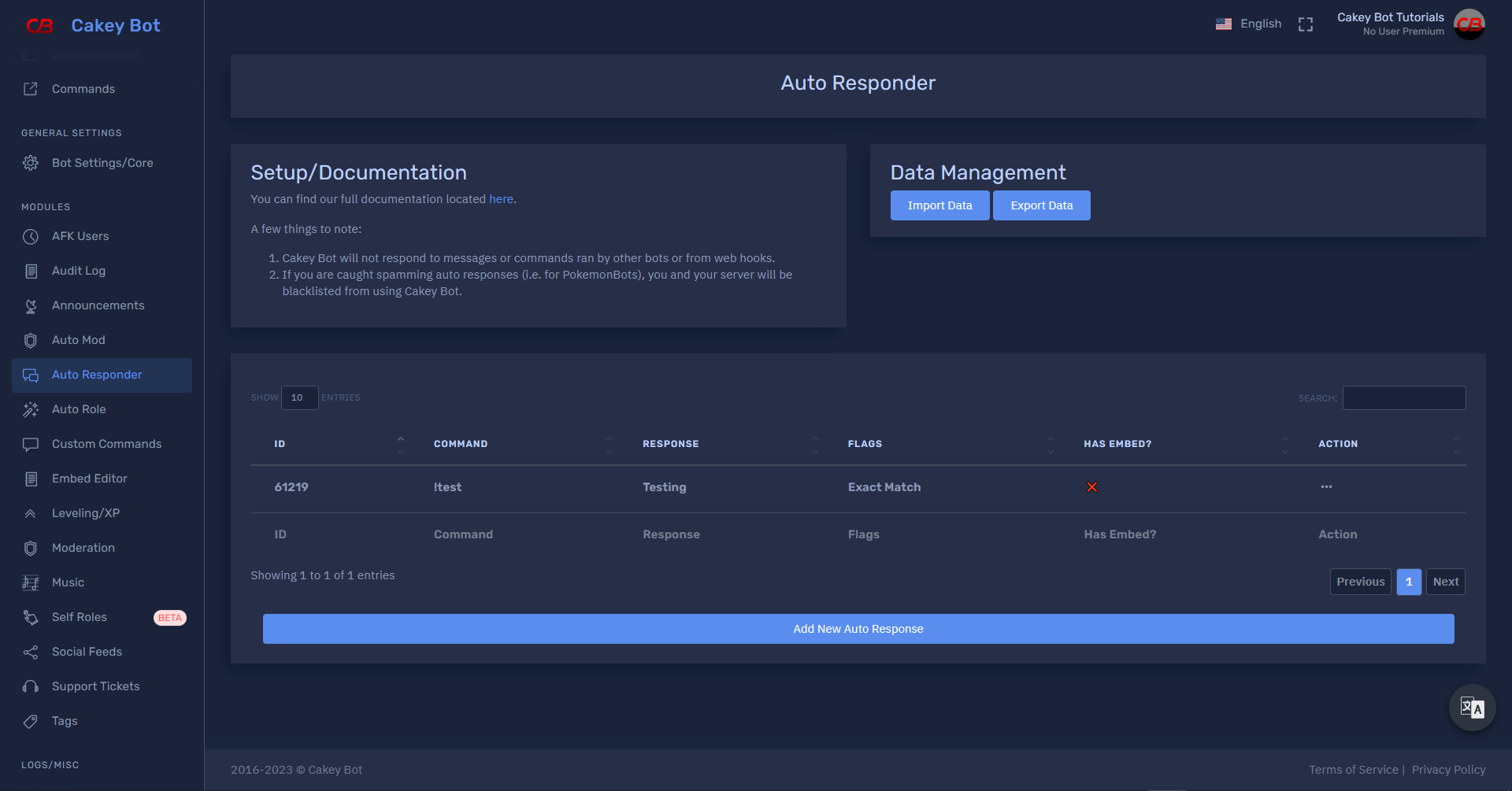
This feature allows you to set up custom triggers on Discord that Cakey Bot can automatically respond to. For example, you can make Cakey Bot respond to messages such as wot with a link to a funny gif. You can also set some flags to determine what types of messages Cakey Bot will respond to.
¶ Setup
You will need
Manage ServerorAdministratorpermission to manage servers and auto responders.
You can also grant specific users or roles dashboard access without requiring Manage Server or Administrator. See Dashboard Access for details.
- Login to the web dashboard on the main website here.
- Click on the server you want to edit auto responders on.
- Go to the "Auto Responder" page.
- You can then create, delete, and edit any responses on this page. You can get an overview of any flags that are available below.
¶ Flags
Note: Only a single auto responder will ever trigger on a given message, even if the message meets the requirements of multiple auto responders. This selection is prioritized by the lowest ID of any matching responders.
| Flag Type | Description | File Extensions |
|---|---|---|
| Exact Match | Default behavior, looks for exact match strings | – |
| Contains | Will search the entire message to see if it contains this string/trigger | – |
| Starts With | Will check to see if the message begins with this string/trigger | – |
| Ends With | Will check to see if the message ends with this string/trigger | – |
| Contains Files | Will check to see if the message contains any files/attachments (i.e. documents, images, videos) | – |
| From Webhook | Will check to see if the message was sent by a webhook | – |
| Contains user mention | Will check to see if the message contains a user mention | – |
| Contains channel mention | Will check to see if the message contains a channel mention | – |
| Contains role mention | Will check to see if the message contains a role mention | – |
| Wildcard Contains | Searches message with wildcard support: * (any chars), ? (single char), use \? for literal question marks |
– |
| Regex Match | A more powerful version of wildcard, allows full regular expressions | – |
| Contains image attachment | Checks if attachments include image formats | .jpg, .jpeg, .png, .gif, .bmp, .tiff, .ico, .svg, .webp, .heic, .heif, .jfif, .exif, .raw, .psd, .ai, .eps |
| Contains video attachment | Checks if attachments include video formats | .mp4, .avi, .mkv, .mov, .wmv, .flv, .webm, .m4v, .mpeg, .mpg, .3gp, .rm, .swf, .vob, .ts |
| Contains audio attachment | Checks if attachments include audio formats | .mp3, .wav, .flac, .aac, .m4a, .wma, .ogg, .alac, .aiff, .opus, .mid, .midi, .amr, .ape |
| Contains text attachment | Checks if attachments include document/text formats | .txt, .csv, .json, .xml, .html, .htm, .md, .log, .rtf, .doc, .docx, .pdf |
| Contains executable attachment | Checks if attachments include executable formats | .exe, .msi, .bat, .sh, .app, .jar, .com, .cmd, .vb, .vbs, .ps1 |
Note: When using the "Contains Files", "From Webhook", and "Contains X mention", the "Command" field is still required. However, it is not used to actually trigger the auto response. It's purely a cosmetic property.
¶ Regex Match Triggers
Every message sent in your server is checked against every regex trigger you have, so each one is given a strict time budget to match in. A pattern that takes too long is abandoned.
If a regex trigger repeatedly runs out of time, Cakey Bot disables that auto responder automatically rather than letting it slow down every message in the server. You'll find it toggled off on the dashboard. Fix the pattern and re-enable it.
The usual cause is a pattern that isn't anchored. Without ^, the engine doesn't read the message once. It starts over from every single character in it, so a 200 character message is scanned 200 times instead of once, and that cost climbs sharply on longer messages.
Anchoring the pattern with ^ tells it to try once, from the start:
| Pattern | |
|---|---|
| Slow | (?i)(?=.*\bhello\b)(?=.*\b(help\|support)\b).* |
| Fast | (?si)^(?=.*\bhello\b)(?=.*\b(?:help\|support)\b).* |
Both match the same messages. The differences that matter:
^anchors it, so the message is read once instead of once per character. This is the important one.smakes.match newlines too. Without it an anchored pattern only ever sees the first line of a multi-line message.(?:...)makes the group non-capturing, so the engine isn't storing text you never use.
Patterns are matched case-insensitively already, so you don't need
(?i). Avoid[\s\S]and other constructs that rely on an uppercase letter, since patterns are lowercased before they run and[\s\S]would become[\s\s], which only matches whitespace. Use thesflag instead.
Shortening your list of words is rarely the fix. Alternation over a dozen short words costs almost nothing next to an unanchored scan.
¶ Permissions
Every auto responder has an optional, collapsed-by-default Permissions section in its create/edit/clone form on the web dashboard. Use it to restrict who can trigger a response and where, without needing to write anything into the response text itself.
| Selector | Effect |
|---|---|
| Required Roles | The member must hold any of the selected roles to trigger this response. |
| Excluded Roles | A member holding any of the selected roles is blocked from triggering this response. |
| Required Channels | The response can only trigger in one of the selected channels. |
| Excluded Channels | The response is blocked in the selected channels. |
| Required Users | Only the selected users can trigger this response. |
| Excluded Users | The selected users are blocked from triggering this response. |
Leave a selector empty to skip that restriction entirely. All six selectors are independent — you can combine, for example, a Required Role with an Excluded Channel on the same response.
Required and Excluded checks for the same category (e.g. Required Roles + Excluded Roles) are both evaluated — a member could technically satisfy a Required Role while also holding an Excluded Role, in which case the exclusion still blocks the response.
This replaces the old
{require:}/{not:}text placeholders. Those are no longer supported — any existing auto responders using them were migrated to the new Permissions selectors automatically.
¶ Limitations/Restrictions
- You can't have duplicate tags with the same name
- Auto Responders are also limited to Discord's message character limit
- Messages sent by bots or webhooks will be ignored
- Non-Premium servers are limited to 100 auto responders. Premium servers have no cap on the number of auto responders.
- Regex triggers that repeatedly take too long to match are disabled automatically. See Regex Match Triggers.
¶ Placeholders/Variables
Auto Responder will work with BOTH Basic Placeholders & Advanced Placeholders. Placeholders can be included in the response section and can modify the behavior/output of the response. You can find the list of supported placeholders here.
¶ Using Emoji/Emotes in Responses
Emoji/Emotes CAN be used in auto responders. However, it requires slightly more work due to how discord parses emotes. Normally in Discord, you could just type :lel: or :smile: to get an emote, however in Cakey Bot, neither of these will work. In order to get valid emojis you have to send the emojis in discord but place a backward slash in front of it to get the emote's full ID. Like so: \:lel: or \:smile: which will produce these results: <:lel:408424717217693717> or for Unicode emoji: 😄 . Once you have the full emoji id or the raw Unicode output, you can paste these into Cakey Bot's web dashboard and they should work as long as Cakey Bot is in a server that has that custom emote in it.
It is worth noting that Cakey Bot can use emojis in between servers (similar to nitro users). So if you have an emoji in Server #1, you can use that emoji in a response for Server #2 if Cakey bot is in both of those servers.
¶ Using Images in Responses
To use images in responses, you can simply just type the image URL/link like you would in a normal message. If you have the file on your local machine/PC but no URL/link, you can upload it to an image hosting website (such as Imgur) and paste the URL they provide into the response. Cakey Bot should automatically embed the image in Discord's client if it's a valid URL/image.
¶ Custom Embeds Premium Only
You can include an optional embed on responses by following the steps below:
- Follow the instructions at the top of this page to sign in to the dashboard.
- Open the Embed Editor and design your embed.
- Click Save (or Save As New) and give it a name.
- Create an auto responder like you normally would, then select your saved embed from the Custom Embed dropdown.
Custom embeds will work with all Basic Placeholders. You can find the list of supported placeholders here. Custom embeds will NOT work with the Advanced Placeholders.
¶ Bulk Import/Export
You must apply via support tickets to get access to Bulk Import. Anyone can use Bulk Export without applying. This is to decrease potential abuse.
¶ Limitations/Guidelines
- File MUST be in CSV format.
- File MUST be formatted with all of the required columns.
- Additional/extra columns will be ignored.
- Any fields that have too many characters will be trimmed. Column limits:
- Command: 200 characters
- Response: 2,000 characters
- Any fields that exceed the character will NOT work after importing.
- Bulk importing can NOT be canceled or reversed once started.
- Any broken commands will have to be individually deleted or fixed after the import is finished.
- There is a limit of 500 commands per bulk import.
¶ What do the columns/fields and their values mean?
The template CSV file and bulk exported CSVs will have a few different columns with various restrictions. These are explained below:
-
Status
- This determines whether or not the command/response is "enabled" or "disabled"
- Acceptable values:
- 0 - Disabled
- 1 - Enabled
-
Command
- This is the command/trigger phrase for a response.
- It must be less than 200 characters.
-
Flags
-
These are only used for Auto Responders, they map directly to the Auto Responder flags.
-
Acceptable values:
Value Flag Name 1 Exact Match 2 Contains 3 Starts With 4 Ends With 5 Contains Files 6 From Webhook 7 Contains user mention 8 Contains channel mention 9 Contains role mention 10 Wildcard Contains 11 Regex Match 12 Contains image attachment 13 Contains video attachment 14 Contains audio attachment 15 Contains text attachment 16 Contains executable attachment
-
-
Response
- This is the response phrase for a trigger/command.
- It must be less than 2,000 characters.
-
Embed
- This is an optional field for responses that use a Cakey Bot custom embed. Embeds can only be used by Premium Servers regardless if a value is set here or not.
- This must be the numeric ID of an embed already saved for this server in the Embed Editor — you can find a saved embed's ID in the Custom Embed dropdown. Leave blank for no embed.
-
RequiredRoles / ExcludedRoles / RequiredChannels / ExcludedChannels / RequiredUsers / ExcludedUsers
- These are all optional and correspond directly to the Permissions selectors.
- Each field accepts a semicolon-separated (
;) list of Discord role, channel, or user IDs (matching the relevant field). Leave a field blank to skip that restriction. - Example:
237273200055156736;225182513465786369sets two required/excluded roles at once. - Older CSV files exported before the Permissions feature existed can still be imported — these columns will simply be treated as blank (no restrictions).